



Wir zeigen dir dabei, was unser E-Recruiting-System alles kann.
Unsere HR-Spezialisten freuen sich auf dich!
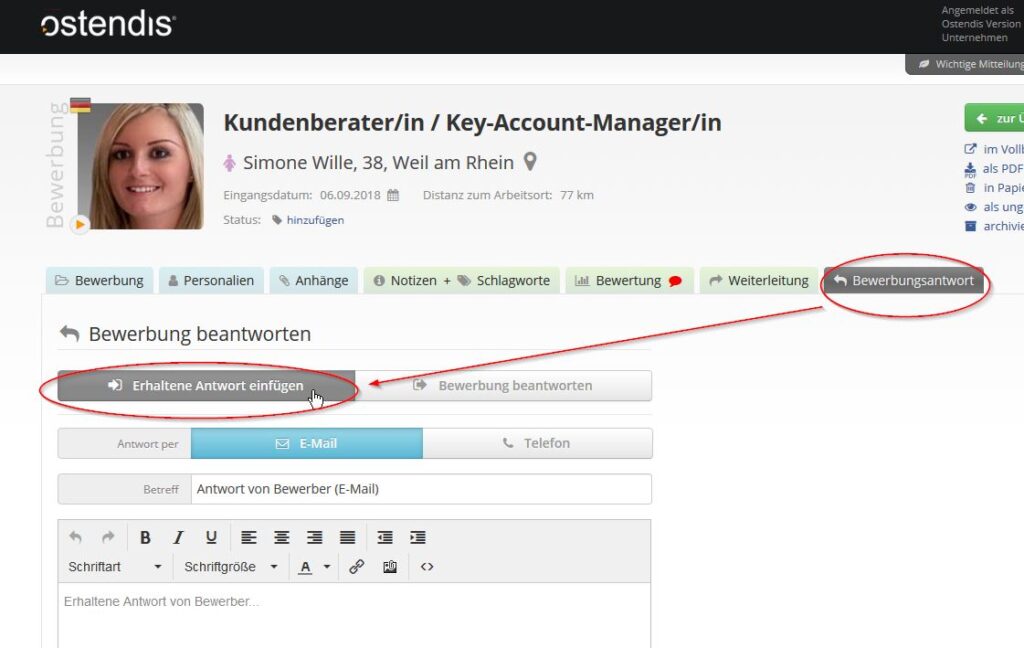
Gehen Sie hierzu im Kandidaten zum Tab «Bewerbungsantwort». Dort wählen Sie den Tab «Erhaltene Antwort einfügen». So können Sie einerseits eine Telefonnotiz oder einen E-Mail-Text hinzufügen und speichern. Damit sind wichtige Informationen und der komplette Kommunikationsverlauf mit dem Kandidaten im System dokumentiert.

Das Gewinnspiel wird durchgeführt von: Ostendis AG, Aarauerstrasse 46, 5706 Boniswil, Schweiz.
Das Gewinnspiel beginnt am 25. März 2025 um 09:00 Uhr und endet am 26. März 2025 um 17:00 Uhr mit der Beendigung des HR Festivals.
Die Ostendis AG behält sich vor, das Gewinnspiel jederzeit aus wichtigem Grund zu beenden, insbesondere bei höherer Gewalt oder technischen Problemen, die eine ordnungsgemässe Durchführung verhindern.
Die Ostendis AG haftet nur für Schäden, die vorsätzlich oder grob fahrlässig verursacht wurden. Diese Haftungsbeschränkung gilt nicht für Schäden aus der Verletzung des Lebens, des Körpers oder der Gesundheit.
Der Rechtsweg ist ausgeschlossen.
Sollte eine Bestimmung dieser Teilnahmebedingungen unwirksam sein oder werden, bleibt die Gültigkeit der übrigen Bedingungen hiervon unberührt.
Mit der Teilnahme am Gewinnspiel akzeptieren die Teilnehmenden diese Teilnahmebedingungen.